

How Automation Improves Metal Fabrication Efficiency
Time : Nov 12, 2026 عدد المشاهدات: 146
Automation improves Metal Fabrication Efficiency by making the work between process steps more consistent. A cutting machine can complete its programmed task, yet the shop may still lose time staging material, waiting for the next job, moving parts, checking status, or correcting avoidable errors. The biggest gains often come from connecting these handoffs.
For buyers reviewing fabrication equipment, the WiseCut fiber laser cutting machine category provides a starting point for comparing available machine types.
That does not mean every fabrication shop needs a fully automated line. A better approach is to identify the constraint that limits output today, then automate the repeatable work around it. Depending on the operation, that may include material staging, loading and unloading, job tracking, part identification, inspection, or production scheduling. People remain responsible for judgment, quality decisions, maintenance, and exception handling.
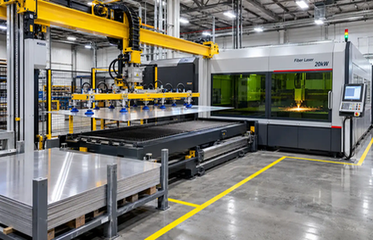
Quick answer: automation improves the workflow between machines
Automation improves efficiency when it reduces waiting, repeated handling, unclear job status, and variation in routine tasks. It can help a shop move material through a defined sequence, keep production information visible, and detect problems earlier.
However, automation is only useful when the process is already understood. If materials have no fixed staging locations, job priorities change without clear rules, or operators lack a recovery procedure, adding equipment can transfer the same confusion into a more complicated system. Start with a process map and a measurable objective.
Where metal fabrication automation creates the biggest gains
Material staging, loading, and unloading
Material handling is often a practical starting point because it affects every job. Sheets, tubes, blanks, and finished parts need clear locations and defined movement paths. Operators may lose time searching for material, repositioning it, or preparing the next job while the machine is ready.
Automated loading and unloading can reduce interruptions when the equipment matches the material format, weight, job mix, and available space. As one configuration to review, see the fiber laser cutting machine with auto sheet loading. Ask for the complete sequence: where raw material is placed, how the next job is identified, where finished parts go, and what happens when a sheet is damaged or a job changes priority.
Part movement, sorting, and identification
A part that leaves one operation still needs to reach the correct next step. Clear staging areas, labels, job numbers, and destination rules reduce mixed orders and unnecessary touches. Automation can support these rules by moving or identifying parts, but it cannot compensate for an undefined workflow.
Before selecting a system, list the common points where parts are lost, mixed, or held without a clear owner. Those points usually reveal a more valuable improvement opportunity than a faster movement cycle alone.
Setup and changeover coordination
Changeovers can consume capacity when tools, programs, materials, and operators are not ready together. A connected workflow can show what the next job needs and make preparation visible before the current job ends.
The objective is not to remove every changeover. It is to reduce avoidable waiting and make the required steps repeatable. Measure the time spent preparing, changing, verifying, and restarting a job so improvement can be judged against a baseline.
How automation supports cutting-cell efficiency
Connect material input to the cutting process
A cutting cell works more efficiently when material input, processing, unloading, and part handling are planned as one sequence. The layout should show staging positions, operator access, machine access, service space, and the route for completed parts.
This is especially useful when a shop handles repeat jobs or a steady mix of similar work. An ماكينة قطع الألياف بالليزر ذات طاولة التبديل is one configuration buyers can include in that comparison. A defined cell can make responsibilities clearer and reduce unnecessary movement. It should still allow safe access for setup, maintenance, inspection, and fault recovery.
Reduce interruptions during repeat production
Repeat production benefits when the next material and job information are ready before the current cycle ends. Automation can help coordinate this preparation and reduce the number of times an operator must stop the machine to perform a routine handoff.
The result depends on the whole sequence. If unloading is automated but finished parts remain unsorted, the bottleneck may simply move downstream. Review the complete cycle from raw material release to finished-part handoff.
Design around access, floor space, and service
An efficient cell must fit the facility. Check material routes, operator positions, service clearances, utilities, and space for finished parts. A compact layout can create new delays if it blocks loading access or makes maintenance difficult.
Include exception paths in the design. Operators need a clear method for handling damaged material, incorrect job data, a machine stop, or a part that fails inspection. The ideal cycle is only one part of real production.
Production scheduling and workflow visibility
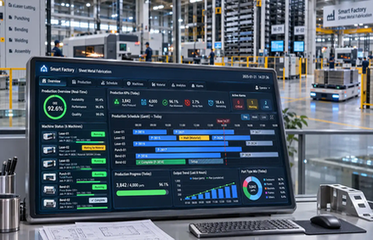
Automation creates more value when production status is visible to the people making decisions. A useful view shows which jobs are ready, which materials are available, what the machine is processing, and what is waiting for attention.
Prioritize work by bottleneck impact
The fastest job is not always the best next job. Priorities may depend on material availability, downstream deadlines, setup changes, or the risk of interrupting a larger sequence. Automation can apply consistent rules, but the rules must reflect the shop’s real priorities.
Begin with simple status labels such as ready, running, waiting for material, inspection required, and complete. Clear labels reduce time spent searching for updates or asking several people for the same information.
Use data to find waiting time
Data is valuable when it supports a decision. Track waiting time, setup time, material interruptions, rework, and unplanned stops. Then look for recurring patterns rather than reacting to a single unusual job.
The purpose is not to collect every possible metric. It is to find the constraint that limits the workflow now. After that constraint improves, the next bottleneck may appear elsewhere.
Automation and quality control
Quality automation should address the defects that matter most to the operation. Depending on the process, this may include checking dimensions, confirming job status, identifying parts, or separating work that needs review.
Move checks closer to the process
When inspection happens only at the end, a problem may affect many parts before anyone notices. A check near cutting, forming, or another key step can provide earlier feedback. The method should match the part, tolerance, material, and inspection plan.
Automation does not create a quality standard by itself. Acceptance criteria must be clear, and someone must be responsible for deciding what happens when a result falls outside the agreed range.
Link quality information to the job
Part identification becomes more useful when many jobs share similar materials or shapes. Labels, job numbers, or digital records can connect a part with its order and inspection status. That reduces the risk of mixing work and makes it easier to trace a problem to the process that created it.
The human side of automation
Automation improves efficiency when responsibilities are explicit. Operators still prepare materials, monitor the process, handle exceptions, perform routine checks, and make decisions that a programmed sequence cannot make reliably.
Training should cover both normal operation and recovery. What should an operator do when material is out of position? Who can change a job priority? Which conditions require maintenance support? These answers belong in the operating procedure.
Alerts should also be useful. A message should explain what needs attention and what action is allowed. Too many unclear alarms can create a new source of delay.
How to measure the efficiency improvement
A business case should connect the automation project to measurable workflow outcomes. Useful measures include:
Lead time from material release to completed parts
Machine utilization and waiting time
Setup and changeover duration
Manual handling touches per job
Scrap, rework, and missing-part incidents
On-time completion of scheduled work
Overtime caused by avoidable interruptions
Time spent searching for material or job information
Set a baseline before installation. Otherwise, it is difficult to tell whether an improvement came from automation, a product-mix change, additional staffing, or a temporary production push.
Include the full project scope in the calculation: equipment, integration, layout changes, utilities, training, maintenance, software support, and downtime during installation. A lower purchase price may not produce better efficiency if the system creates difficult handoffs or frequent manual intervention.
A practical roadmap for automating a fabrication workflow
1. Map the current process
Document every step from material receipt to finished-part handoff. Record who performs it, what information is needed, how long it takes, and what interrupts it.
2. Choose one constraint
Select the delay with the clearest operational impact. It may be loading, scheduling, part sorting, inspection, or movement between machines. Define the expected improvement before selecting equipment.
3. Design the complete cell
Show material locations, operator positions, access routes, service space, inspection points, and finished-part destinations. Include exception paths so the design works outside the ideal cycle.
4. Confirm responsibilities
Define what the machine handles, what the operator handles, and what requires maintenance or management support. Add these responsibilities to training and standard procedures.
5. Pilot and measure
Start with a manageable product group or workflow segment. Compare the baseline with the same measures after implementation. Fix handoff problems before expanding the system.
FAQ: automation in metal fabrication
Does automation always require a fully automated production line?
No. A shop can begin with one constrained step, such as loading, job tracking, part identification, or inspection. The right starting point is the activity that creates measurable delay or variation. A focused improvement is easier to test and connect to later stages.
Should a shop automate material handling first?
It is often a useful area to evaluate because material movement affects many jobs. The decision depends on material format, weight, job mix, floor space, and current bottlenecks. Map the workflow first, then compare handling improvements with other options.
How can a company measure automation ROI?
Use a before-and-after baseline. Compare lead time, waiting time, setup duration, handling touches, rework, on-time completion, and project operating costs. Include integration, training, maintenance, utilities, and installation downtime in the calculation.
What happens when an automated workflow encounters an exception?
The workflow should define a safe recovery path before implementation. Document who handles damaged material, incorrect job data, machine stops, missing parts, and inspection failures. Automation is more reliable when exceptions are planned instead of treated as unusual surprises.
Final decision: automate the constraint, then connect the workflow
Automation can improve Metal Fabrication Efficiency by reducing avoidable handling, making repeat work more consistent, improving production visibility, and detecting problems earlier. Its value depends on the complete workflow rather than one machine feature.
Before approving a project, identify the current constraint, define the expected improvement, and map the people, materials, information, and equipment involved. The most effective automation is the system that makes the next job easier to prepare, run, inspect, and deliver.
When comparing suppliers, use the Wise-Cut website as an additional company reference, then request the exact automation scope, layout, and support details for the configuration under consideration.


