

Why Does My Laser Welding Protective Lens Keep Burning?
Time : Oct 09, 2026 View : 177
A protective lens can survive many welding jobs, then suddenly develop a black spot after a few minutes. Replacing it may restore the beam for a while, but another lens soon burns in the same place. That pattern points to a problem elsewhere in the torch or process.
Frequent laser welding protective lens burning usually begins with contamination, spatter, poor gas delivery, incorrect focus, or an off-center optical path. A damaged focus lens or seal can also keep ruining every new protective lens. The quickest route to the cause is a fixed inspection order, starting at the outer lens and moving inward only when the earlier checks pass.
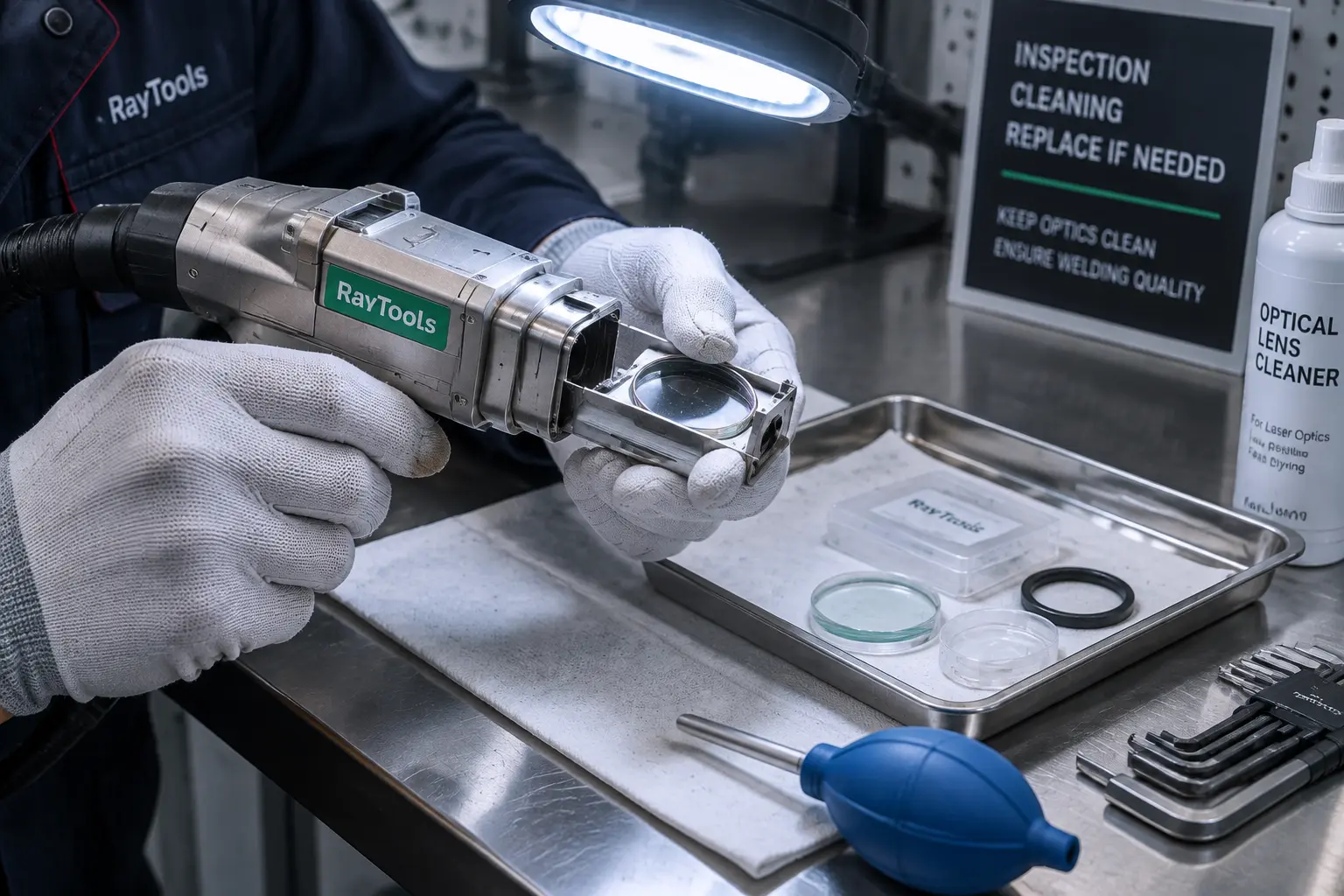
What Does a Burned Protective Lens Look Like?
Check the lens when welding power gradually falls, the wire stops melting normally, the weld becomes uneven, or a flame appears near the copper nozzle. Visible signs include black dots, a cloudy film, scratches, cracks, white marks, and damaged coating.
A loose particle or light surface deposit may be removable if the manufacturer permits cleaning. A laser welder lens damaged by a hot spot usually keeps a dark mark after approved cleaning. Cracks, coating loss, and permanent stains also call for replacement. Continuing to weld with this damage can reduce beam transmission and expose the focus lens to more heat and contamination.
Why Does a Small Spot Burn Through the Lens?
A clean protective lens passes most of the beam through the welding head. Dust, oil, smoke residue, fingerprints, and metal particles absorb part of that energy. The contaminated point heats faster than the surrounding glass, forming a hot spot. As the mark grows, it absorbs more energy and scatters more of the beam.
This explains why a tiny black dot can turn into a cracked lens or a weak, unstable weld. Scattered energy may also strike the lens holder or copper nozzle. A replacement lens will fail again when contamination remains inside the lens drawer, seal, or gun body.
What Causes Laser Welding Protective Lens Burning?
Several faults produce similar marks. Their position and timing help narrow the cause. Spatter tends to leave random dark points, while repeated damage in one location suggests focus or optical alignment.
Spatter and Torch Position
Molten droplets can travel back toward the nozzle and land on the protective lens. The risk rises when the torch points directly into the weld pool, movement is unsteady, or the nozzle works too close to the surface. Reflective materials can send part of the beam back toward the welding head before the weld pool becomes stable. Keep people and reflective objects out of that return path.
Dust, Oil, and Fingerprints
Lens changes often take place beside grinders, cutting tables, and oily workpieces. Opening the lens drawer in that environment gives airborne particles a direct route into the optical cavity. Touching the surface leaves skin oil that can become a hot spot. Store spare lenses in sealed packaging and handle them by the edge with clean gloves.
Low or Unstable Gas Flow
Shielding gas protects the weld and helps move fumes and particles away from the torch opening. Low pressure, an empty cylinder, a restricted hose, or a faulty valve can allow contamination to reach the lens. Gas quality matters too. The WiseCut troubleshooting procedure specifies pure argon or pure nitrogen for the applicable system. Verify the gas grade, regulator, hose, and machine setting before welding.
Incorrect Focus Position
Focus that sits too far above or below the intended point changes energy distribution at the workpiece. It can increase spatter, heat reflection, and heating around the nozzle. In severe cases, the welding surface may flare and the copper nozzle can burn. Use the focus procedure supplied with the machine and test on the specified material under controlled conditions.
Red-Light or Optical-Path Shift
The red aiming light should appear at the center of the copper nozzle. A slight shift may be corrected through the laser-center setting on systems that support screen adjustment. A large deviation can make the beam strike internal parts, overheat the seal, and contaminate the gun body. Internal mechanical alignment belongs to a trained technician.
Dirty or Damaged Focus Lens
If a fresh protective lens burns again after the lens drawer has been cleaned, inspect the focus lens according to the service manual. Black spots or contamination on that lens can disturb the beam and repeatedly damage the outer lens. The handheld laser welding systems page shows the main equipment category and optical-head arrangement used for this type of work.
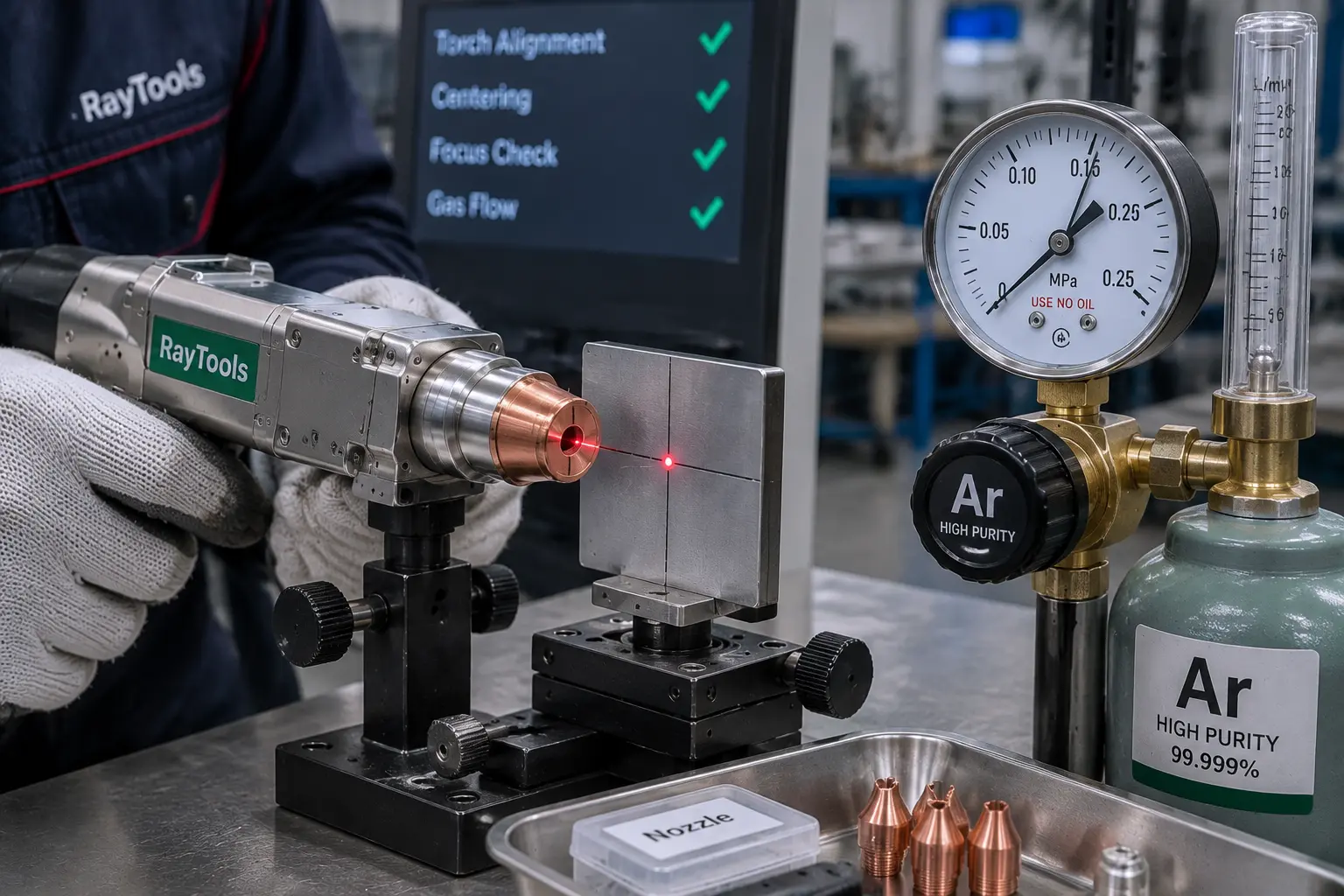
How Should You Troubleshoot Repeated Lens Damage?
Turn off laser output before opening any part of the welding head. Shut the system down, isolate power as required, close the gas supply, and follow the lockout procedure in the machine manual. Optical inspection should take place in a clean, still-air area. Internal lens removal and torch alignment require trained service personnel.
Step 1: Inspect the Protective Lens
Remove the lens drawer by the approved procedure and hold the lens under a bright inspection light. Look from several angles for black spots, dust, haze, cracks, scratches, and coating damage. Also inspect the drawer and retaining parts. Replace a lens with a permanent burn point or physical damage.
Step 2: Check the Focus Lens
A second failure after correct protective-lens replacement moves the investigation inward. Check the focus lens for stains and dark points. Replacing outer lenses will not solve contamination on the internal optic. Leave focus-lens work to a service technician when required by the manual.
Step 3: Check the Red-Light Position
Fit the clean optical parts correctly, then check whether the red light exits through the center of the copper nozzle. Use the screen correction only within the range allowed by the manufacturer. A large offset, unstable red light, or unusual sound inside the torch needs mechanical inspection.
Step 4: Inspect the Seal and Gun Body
Severe red-light shift can damage the sealing ring. A poor seal then allows smoke and dust into the gun body, where they contaminate the next lens. Inspect the seal for heat damage or deformation and check the cavity for residue. Replace affected seals and lenses as one repair, followed by optical alignment.
Step 5: Verify Focus, Gas, and Pressure
Confirm the focus using the procedure for the torch, nozzle, wire setup, and workpiece. Then check the gas cylinder, regulator, hose, solenoid valve, and pressure signal. The WiseCut material gives 0.150 MPa as a welding and cleaning reference for its applicable pressure-sensor setup. Use the value specified for your machine because torch designs and processes vary. The water-cooled laser welding machine page lists the system’s coaxial protective-gas mode and red-light indication.
Can a Protective Lens Be Cleaned?
Cleaning is suitable only for contamination that has not burned into the coating or glass. Start with the method in the equipment manual. Wear clean gloves, hold the lens by its edge, and remove loose dust with approved optical-cleaning equipment. Use optical-grade wipes and the specified cleaning fluid for light residue.
Paper towels, ordinary cloth, dirty compressed air, and dry rubbing can scratch the coating or add oil and moisture. Inspect the lens again under a bright light. Replace it if a black spot, scratch, crack, white mark, or coating defect remains. Clean the lens drawer and seal area before fitting the replacement, or particles may transfer straight onto the new surface.
How Can You Prevent the Next Lens from Burning?
A short check before each shift catches most early warning signs:
- Inspect the protective lens, copper nozzle, and lens drawer.
- Confirm that the red light exits through the nozzle center.
- Check the gas type, cylinder level, regulator, pressure, and hose.
- Keep the replacement area clean and free from moving air.
- Use the approved focus for the nozzle and welding setup.
- Hold a stable torch angle and control the distance from the weld pool.
- Review power, travel speed, wobble width, and wire settings after a material change.
- Record lens life, burn-mark position, material, parameters, and operator observations.
A repeated mark at the same lens position is useful evidence. Photographs taken before disposal can help technical support identify a beam, seal, or contamination pattern.
When Should You Stop Troubleshooting and Call a Technician?
A new lens that burns quickly requires technical diagnosis. Service is also required for severe red-light offset, focus-lens damage, contamination inside the gun body, water leakage, abnormal noise, unstable output, or persistent alarms. Opening the internal optical assembly can introduce more dust and disturb alignment. Use qualified laser welding technical support for these repairs.
High-power handheld laser welders can produce hazardous direct and reflected radiation. Troubleshooting must take place inside the required laser-controlled area with the specified protective equipment. A standard welding helmet or ordinary safety glasses do not provide laser protection.
WiseCut Lens Support and Replacement Guidance
WiseCut handheld laser welding equipment uses red-light indication, coaxial protective gas, control monitoring, and safety alarms to support setup and fault diagnosis. Available services include remote technical assistance, operator training, consumables, and spare-parts supply. When requesting help, send clear lens photographs together with the burn location, material, thickness, power, focus setting, gas type, pressure, and alarm code. You can send the fault details to the support team for machine-specific guidance.
FAQ
Q1: Why does my new laser welding protective lens burn immediately?
A: Check for contamination in the drawer or gun body, an off-center red light, a damaged focus lens or seal, incorrect focus, and poor gas delivery. A mark that returns in the same location often points to an optical-path or internal contamination problem.
Q2: Can a dirty focus lens damage the protective lens?
A: Yes. Contamination or damage on the focus lens can disturb energy distribution and contribute to repeated protective-lens failure. Inspect it when a correctly installed outer lens burns again.
Q3: Should a protective lens with a black spot be cleaned or replaced?
A: Replace the lens when the black spot remains after the cleaning method approved by the manufacturer. Permanent burn marks, cracks, scratches, white spots, and coating damage also require replacement.
Q4: What shielding gas helps protect a laser welding lens?
A: Use the gas specified for the machine and welding process. The applicable WiseCut procedure calls for pure argon or pure nitrogen. Confirm gas grade, cylinder level, pressure, flow stability, hose condition, and regulator setting.
Q5: How can you tell whether the red light is misaligned?
A: The red aiming light should exit through the center of the copper nozzle. A visible offset, an unstable spot, repeated burns in one area, or heating near the nozzle calls for alignment checks under the manufacturer’s procedure.


